
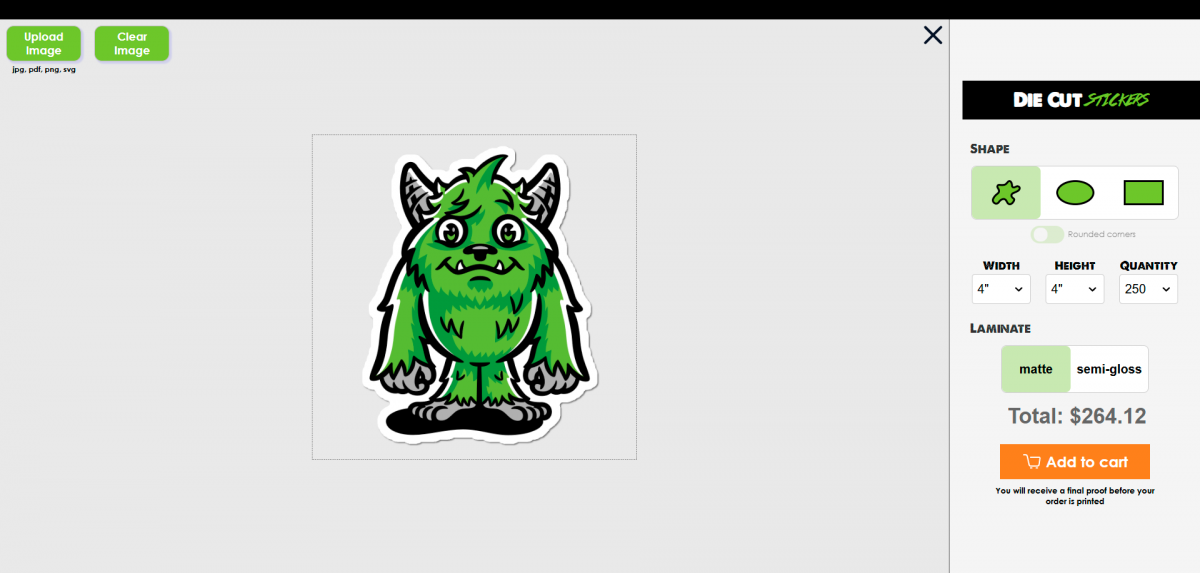
Ready for some big news? We're testing a brand new tool to improve your sticker ordering experience and it's available for you to try out right now.
Sticker Preview Is Here
To improve our proofing process, we've added the optional ability to view and change Die Cut Stickers with a cutline in real time. Change your shape, choose your Laminate, adjust sizing, and get updated pricing in real time before you place your order. Because the Sticker Preview tool is still a work in progess, we're only testing functionality with custom Die Cut Stickers.
How It Works
- Navigate to the Die Cut Stickers page and click Preview Sticker.
- Click the Image Upload button to upload your art file or image. Currently we can accept JPG, PNG, PDF, and SVG filetypes.
- Drag the Bounding Box to adjust the size and scale of your artwork within the chosen shape and size dimension. Change the shape and size at any time, then readjust the artwork placement to your liking.
- Adjust the size dimensions and select a quantity to update pricing and when everything looks good, click Add to Cart and finish checkout.
- Click the button on the next page to upload your file and we'll send a final proof for review within 24 hours.
If you want to order the standard way, simply exit out of the preview by clicking the big X on the top right corner of the artboard.
What's Next
We want to hear from YOU. Submit your feedback and let us know what you like (and dislike) so we can make improvements to give you a tool that works for your custom sticker needs.
Try out a few graphics and show us what you can do!